
How To Use Amazon Product Images on Your Blog the Right Way

The rules around using Amazon product images on your site are confusing and have changed more than once. And the consequences for getting these rules wrong are real.
If your Amazon product images are broken right now, showing as empty placeholders across your posts, it’s not just you. Amazon retired two different image systems in the past few years.
So, let me break down what’s allowed, what’s changed, and how to get the freshest Amazon product images on your blog (with zero code required). New to affiliate income in general? Start with our guide to affiliate marketing for bloggers.
14-day money-back guarantee.
Not eligible for the Creators API yet? Start with text links today and add images once you qualify. Jump to the no-API setup.
Can Amazon affiliates use product images?
Yes, if you’re in the Amazon Associates program and the images come through Amazon’s Creators API.
Screenshots, downloads, and self-hosted copies of Amazon affiliate images are off limits. That goes against Amazon’s rules and puts your affiliate account at risk.
Amazon requires that all of their product images be served through their official API. The image must come directly from Amazon’s servers, stay current, and automatically update if the product listing changes.
📸 Your own photos are always fine. A shot of yourself using the French press you’re reviewing adds personality and credibility. That’s an A+ for authenticity.
Can I paste an Amazon image URL into my post?
No. Right-clicking a product photo and copying its URL feels like a shortcut, but Amazon doesn’t allow you to store its images. An image link is good for 24 hours, then it has to be refreshed from Amazon. A pasted URL sits in your post for years. Sooner or later it breaks, and the whole time it breaks Amazon’s rules.
The image has to come through the Creators API, which hands your site a fresh link each time. That’s the job Tasty Links does in the background.
Why are my Amazon affiliate images broken?
Amazon has changed its image policy twice in recent years. And both times left a lot of bloggers scrambling.
December 2023: Amazon discontinued static image links from SiteStripe. Any image embeds created through SiteStripe stopped working. If you added Amazon images before that date and never updated them, those images are broken on your site right now.
2026: Amazon shut down its Product Advertising API (PA API 5.0) and replaced it with the Amazon Creators API. Old PA API keys don’t work with the new system, so any plugin still using them stopped pulling images. You’ll need new Creators API credentials, which Amazon issues separately.
That’s why images that worked fine for years stopped showing up. Amazon changed the system twice.
The fix is connecting to the new Creators API.
Requirements to get Amazon Creators API access
Amazon doesn’t hand out Creators API access to everyone.
To qualify for the Creators API, you need to (per Amazon documentation):
- Be enrolled in the Amazon Associates program for your target marketplace
- Have a minimum of 10 qualifying sales within the past 30 days
- Register for API access in Associates Central
- Generate API credentials
New to Amazon Associates and not there yet? Tasty Links still turns your keywords into text affiliate links while you build up your qualifying sales.
What if you don’t qualify for the Creators API yet?
Ten Amazon sales in 30 days is a real bar. Plenty of food bloggers with great recipes and steady traffic aren’t there yet. Text-only links still work and still earn commissions.
Say you link to the same Lodge skillet in 40 recipes. Without a plugin, that’s 40 posts to edit by hand every time a link changes. Here’s what Tasty Links does on day one, no API needed:
- Turns every mention of a keyword into your affiliate link, across every post. Amazon or any other program.
- Adds affiliate links to your recipe card’s equipment section.
- Builds internal links between your own posts the same way.
- Adds your affiliate disclosure for you.
Set up your Amazon affiliate keywords in Tasty Links (product names, brand names, ingredient brands you link to regularly). Every mention of that keyword across your site automatically becomes an affiliate link. No Creators API needed. Here’s more on adding Amazon affiliate links to WordPress.
Once you hit the qualifying sales threshold and get API access, adding images to those existing links is a one-time update.
14-day money-back guarantee.
How to add Amazon affiliate product images to your site with Tasty Links
Once you have Creators API access, setup takes about 5 minutes.
Tasty Links (our WordPress link plugin) is a WordPress affiliate link plugin from WP Tasty, built for food bloggers. Add an Amazon link once, and every mention of that product across your site becomes an affiliate link with a fresh photo from Amazon. It’s our plugin for managing your Amazon affiliate links.
Why Tasty Links
- Set it up once, and every mention of “Dutch oven” on your site becomes an affiliate link.
- When Amazon updates a product photo, your posts show the new one. No re-uploading.
- When an Amazon product disappears, Tasty Links flags it, so you fix one link instead of hunting through 40 posts.
- Your affiliate disclosure gets added for you, so Amazon’s disclosure rule is covered.
$49.50 for your first year (renews at $99). 4.97 stars from 60 reviews.
14-day money-back guarantee.
Before I used Tasty Links, my product affiliate links for Amazon weren’t converting. My posts lacked visual appeal, and the products didn’t stand out. After optimizing many of my posts with Tasty Links, the products were showcased better visually, catching the reader’s eye effortlessly. This simple change made a significant impact, and my affiliate conversions increased by 100%. Tasty Links transformed my approach, enhancing the user experience and driving more sales. Now, my affiliate marketing efforts are more successful than ever. I highly recommend Tasty Links to anyone looking to boost their affiliate conversions and improve their content’s visual appeal.

Step 1: Install Tasty Links on your WordPress site
You’ll need version 1.6 or higher to use the Creators API. Grab your subscription, install the plugin, and activate your license key under WP Tasty in your dashboard.
Once Tasty Links is activated, you’re ready to go!
Need more help? Our support doc for getting Tasty Links up and running walks through it with screenshots.
Step 2: Get your Amazon Creators API Credentials
If you’re using text-only links, then you don’t need Amazon API keys. But to add Amazon product images from Amazon, you must get your Creators API credentials.
Log in to your Amazon affiliate account. Click the hamburger menu → Tools. Then, find your Creators API credentials on that page. (Amazon’s Register for Creators API page has the full steps.)
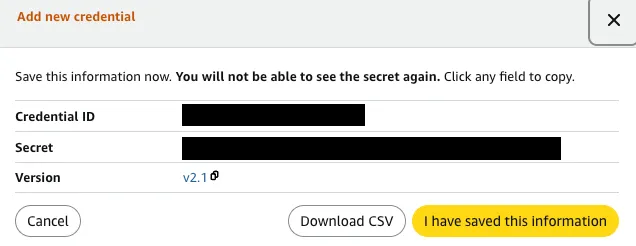
You’ll need four things: Credential ID, Secret, Version, and your Amazon Store ID.
Once you have them, go to WP Tasty → Tasty Links → Settings and enter your Credential ID, Secret, Version, and Amazon Store ID. Then, hit Save.
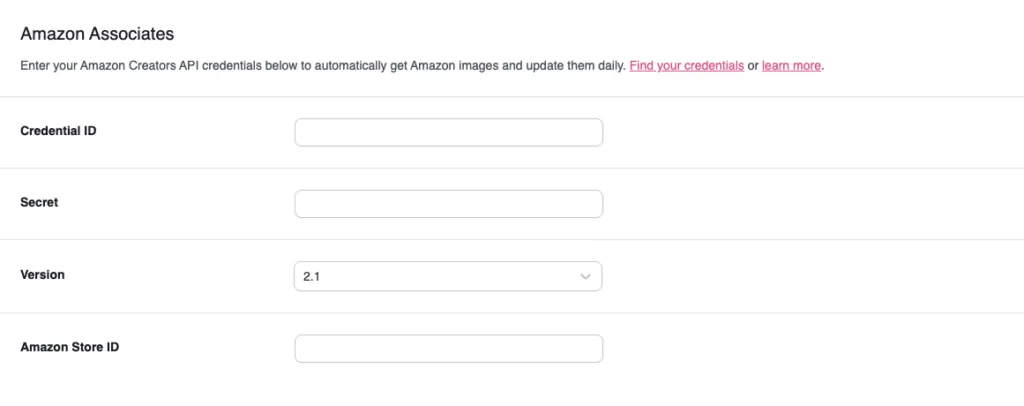
For the full walkthrough with screenshots, see the Tasty Links Amazon setup guide in our support docs.
Step 3: Add your Amazon affiliate links to Tasty Links
From WP Tasty → Tasty Links → Links, click the Add Amazon Link button. Then, it’s a few quick clicks:
- Paste your SiteStripe text link.
- Add the keyword (or keywords) that you want your affiliate link to be associated with.
- Paste your copied Amazon link in the Link section.
- Adjust your link settings and save your link.
Tasty Links grabs the product photo from Amazon for you.
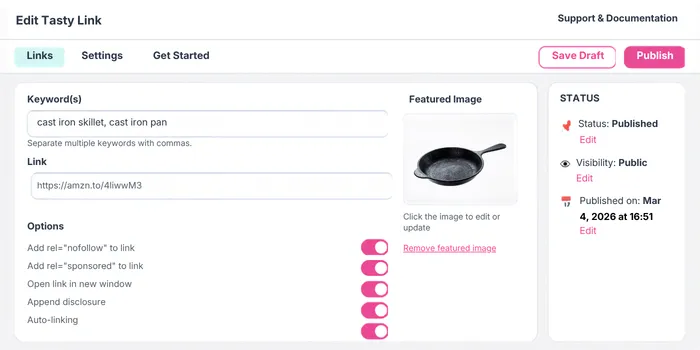
From there, your text link will show up automatically whenever you use that keyword in a post.
Where to use Amazon product images on your blog
Your product photos earn the most in two spots.
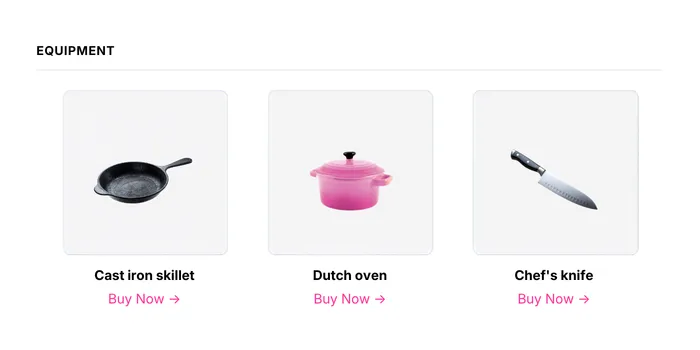
- For food bloggers: your recipe card’s equipment section. Show the tools you used, like your go-to baking dish or trusty pizza cutter. Readers see the product and buy it in one click. Here’s more on Amazon affiliate links in recipe cards.
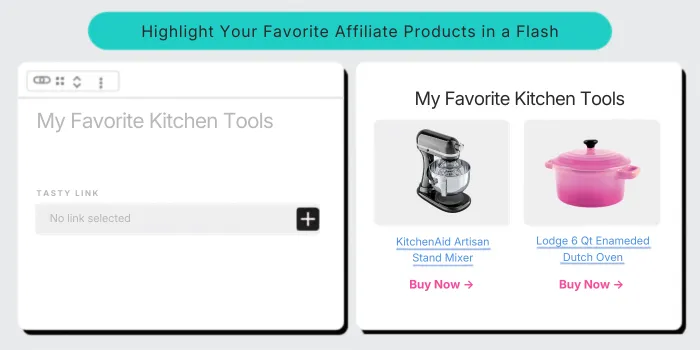
- A featured link block: great for gift guides, product roundups, and anywhere you want a product to stand out. The image and link together are far more clickable than a text link alone.
Both options keep things looking clean and organized, so readers spot your links and click them.
What else does Amazon allow on my blog?
Images are the rule people trip over most. These are the next ones, straight from the Amazon Associates Program Policies:
- Prices: Show an Amazon price only if it comes from the API. If it isn’t refreshed every hour, add the date and time plus Amazon’s line: “Product prices and availability are accurate as of the date/time indicated and are subject to change.”
- Email: Amazon links only go in emails people signed up for. Keep Amazon product images and logos out of your newsletter.
- Ebooks and PDFs: Amazon links and images stay out of downloadable ebooks and printables.
- Pinterest: Pin your own photos, not Amazon’s. Tasty Pins hides any image you choose from the Pin It button. More in how to use Amazon affiliate links on Pinterest.
- Disclosure: Amazon requires this line on your site: “As an Amazon Associate I earn from qualifying purchases.” Tasty Links adds disclosure text for you. Our affiliate disclosure guide has examples.
Ready to fix your Amazon images?
Amazon changed its image rules twice in a few years, and it’ll change them again.
Tasty Links flags broken Amazon links, refreshes images through the Creators API, adds disclosures, and auto-links your keywords across every post on your site.
I just downloaded Tasty Recipes, Tasty Links, Tasty Pins, and Nutrifox and am loving the easy functionality of all of them! The team has been amazing at answering questions and helping me get set up, and the plugins are going to save me so much time. I love the classy look of the recipe plugin, and Tasty Links is so easy to use, especially with the feature that allows me to add affiliate links with their corresponding pictures straight from Amazon with a simple copy and paste! Highly recommend these quality plugins - and the team behind them.

14-day money-back guarantee. If it’s not a fit, we’ll refund every penny.
Not ready yet? Sign up for the WP Tasty newsletter for more affiliate advice, content creator tips, and tools to grow your blog. 🍽️
Still weighing your options? See how Tasty Links stacks up against Lasso and other Amazon affiliate plugins, or browse affiliate programs with no Amazon-style sales minimum.
Questions about setup? Our support team is here to help.