
How do I verify my license key?
Add a license key
- Find your License Number in your Purchase Confirmation email or on the Purchase Confirmation page and copy it.

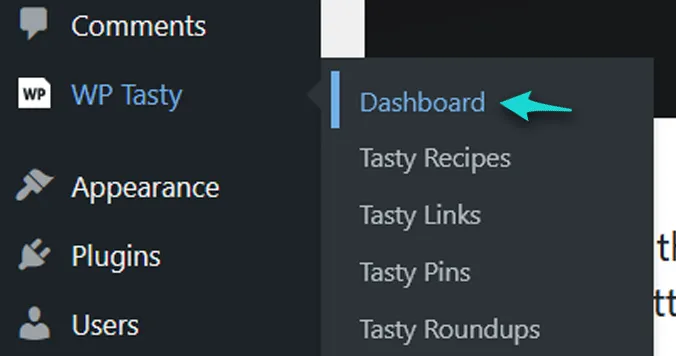
- Log into your WordPress dashboard. Navigate to WP Tasty > Dashboard
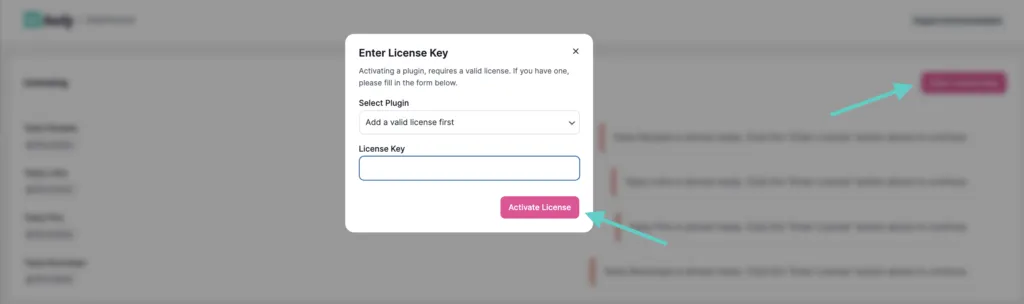
- Click the Enter License button and paste in your license key.
Remove a license key
- Log in to your WordPress dashboard for your blog.
- Navigate to WP Tasty > Dashboard
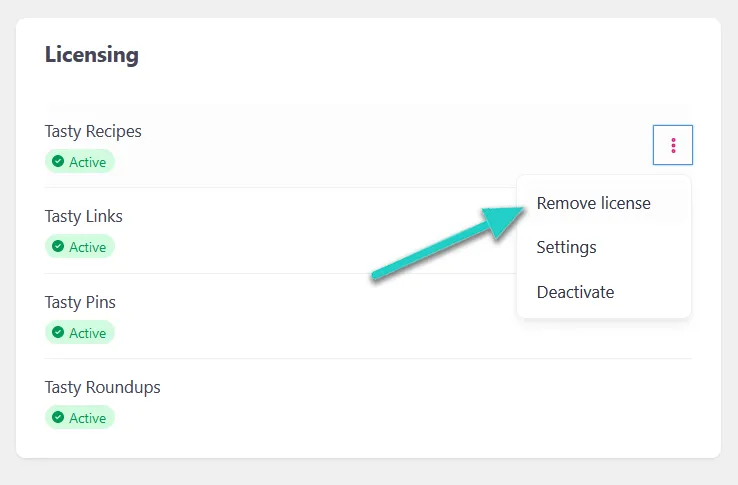
- Hover over the right side of the plugin and click on the three vertical dots, then select the Remove license option.
Troubleshooting
Sometimes, your plugins page may request you to enter a valid license key even though your current license key is still active. There is a simple fix!
- Go to your WP Tasty dashboard page, then remove the license key for your Tasty plugin producing the error message. Here’s how to remove your license key, if you need additional help.
- Once you’ve removed the license key, then, go in and add your license again when prompted.
After that, try clearing your cache in 2 different places.
- Clear your WordPress Dashboard cache.
- Clear your web browser cache.
There may be a small, transient delay of time between reapplying the license key and when the system acknowledges it. Sometimes, it’s instant but other times, it may take a couple of hours.
Have you recently changed your site’s URL? Make sure you update your license key to reflect the domain URL change, otherwise you’ll continue to receive the error message.
Still having trouble after deactivating and reactivating your license?
If removing and re-adding your license key from the Licenses dashboard didn’t resolve the issue, you can pull more detail on why the deactivation is failing:
- Go to Plugins in your WordPress admin.
- Add ?tasty-debug to the end of the URL, e.g. yoursite.com/wp-admin/plugins.php?tasty-debug
- Find the plugin with the license issue and click “Remove License Debug.”
- This will show the full response from the deactivation request. Share that response with our support team so we can pinpoint the issue.
If you’d rather not share admin access, this lets you send us the debug output instead.
If after trying these suggestions, please reach out to us for additional assistance.
