
My recipe added in the wrong place. How do I move it?
Tasty Recipes inserts recipes into your posts with shortcodes. In the Visual editor, you see a preview of your recipe and how it will look on your live site. In the Text editor, however, you will see just a shortcode. Here’s what that will look like:
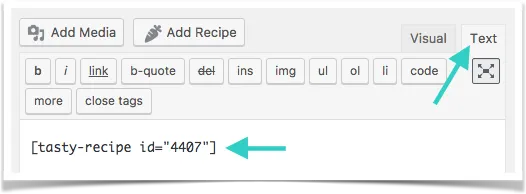
If you accidentally inserted your recipe into the wrong place in your post, simply cut and paste that shortcode (the whole thing including the square brackets) wherever you want your recipe to appear. Be sure to save your changes when you’re done.
